
How do I remove or unpublish my Community listing and events?
Important: Canceling a BASIC or PRO subscription only stops future billing. Your account remains active until your subscription end date, and then automatically continues on our FREE plan (FREE never expires).
What happens when my BASIC/PRO subscription ends?
- Your account automatically switches to a FREE plan.
- Your listing can still appear in the directory with basic information.
- You still have access to the event calendars.
- Any paid features (enhanced fields, upgrades, and premium visibility) will no longer be available.
- Repeat Events is a BASIC/PRO feature, so repeating schedules will stop once your subscription switches to FREE.
If I’m closing my business or no longer hosting Latin events
If you are no longer active in the Latin dance community, please unpublish your listing so the community directory stays accurate. We do not automatically unpublish listings when subscriptions are canceled.
How to unpublish your Community listing
- Log into your account.
- Click on "Community Directory" icon to open My Listings.
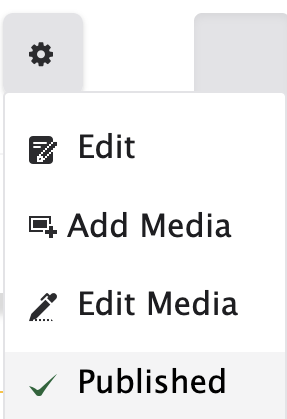
- Next to your listing, click the gear box icon and click "published". This will unpublish your listing immediately.
How to remove or unpublish events
Canceling your subscription does not remove existing events. Manage them from your dashboard:
- Repeat events: repeating schedules will stop when your plan switches to FREE.
- Single/standard events: remain visible until you unpublish or delete them.
If you'd like to upgrade before your end date
If you upgrade before your current plan expires, the unused value of your current subscription is automatically prorated and credited toward the upgraded plan.